Chapter 2
Your location and times
Iqama Times works out the adhan times for wherever the tablet is. Tell it where that is once, and it does the rest every day.
The first time you open the app
A note at the top of the Today screen asks where you are. Pick one:
- Use my location asks the tablet where it is. Say Allow when the browser asks.
- Search for a city lets you type your town instead.
- Keep ISCJ keeps the times for the Islamic Society of Central Jersey in Monmouth Junction, NJ, and hides the note.
You can change this at any time: tap Change next to the place name at the top of any screen, or open Settings › Location.
Settings › Location
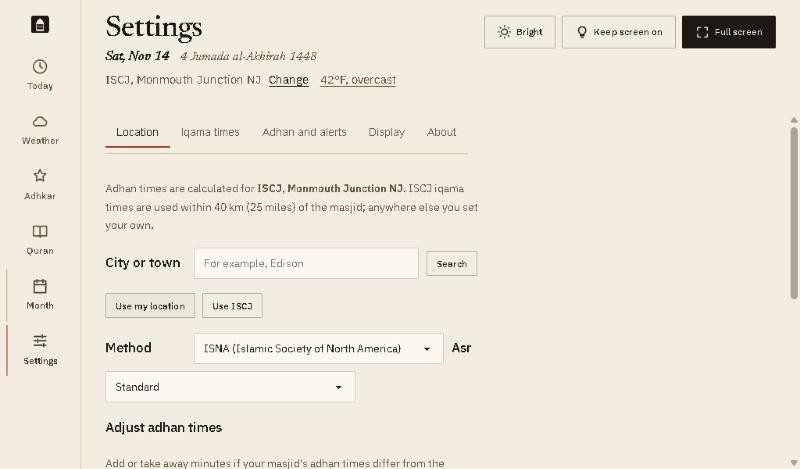
- City or town. Type your town, tap Search, and pick it from the list.
- Use my location sets it from the tablet’s location. Use ISCJ goes back to the masjid’s times.
- Method is how the adhan times are worked out. There are 22 to choose from. ISNA (Islamic Society of North America) is the usual one in the US and Canada. Pick the one your masjid uses.
- Asr: Standard, or Hanafi for the later Asr time.
- Adjust adhan times moves any prayer by up to 30 minutes, if your masjid’s adhan differs from the calculation. Type a number of minutes, with a minus sign for earlier. Reset all to 0 undoes it.
The Hijri date
Further down the same page:
- Hijri date follows the Umm al-Qura calendar. If your local moon sighting is a day or two different, choose 1 day earlier, 1 day later and so on.
- Start the Hijri day at Maghrib. The Islamic day begins at sunset. Turn this on and the Hijri date moves to the next day after the Maghrib adhan. With it off, the date changes at midnight.
Good to know
- Within 40 km (25 miles) of ISCJ, the app uses the masjid’s own iqama times. Anywhere else you set your own iqama times, in chapter 4.
- Prayer times are worked out on the tablet. Your place is only sent out to fetch the weather. Chapter 10 lists everything the app sends.